Aside from browser cache, Peoplesoft has 3 types of cache that can cause issues with performance.
If you are having issues with how you are expecting the functionality to behave and you have verified that your updated code is in the desired environment then try clearing the related options listed.
Process Scheduler cache relates to app engine code, sql and sections along with component interface code. Other processes like SQRs and COBOL don't use cache.
App Server cache relates to code ran in the web browser such as peoplecode, pages and components. It also needs to be cleared after upgrades and bundle applications.
Webserver cache usually needs to be ran after a bundle application, upgrade, patches. Also sometimes you will not see content references or folders that have been migrated. Assuming you have the necessary security to view them, you may need to clear the webserver cache.
Monday, February 6, 2017

Peoplesoft URL Format
The format of a peoplesoft url is broken up into the following parts:
http://server/servlet_name/sitename/portalname/nodename/content_type/content_id?content_parm
The different content type are shown in the image below:
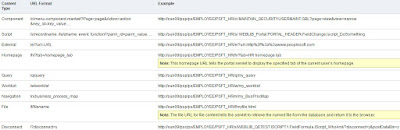
The servlet_name can be 'psp' or 'psc'. 'psc' (peoplesoft component) displays only the content of the peoplesoft component as opposed to 'psp' (peoplesoft portal) which will display the portal layout along with the component content. This can be very useful when you want to print the data on the screen but don't want it to be distorted or to include the headers/footers.
You can read up more about peoplesoft urls at the link below:
https://docs.oracle.com/cd/E41633_01/pt853pbh1/eng/pt/tprt/concept_PortalURLFormats-c071f6.html
http://server/servlet_name/sitename/portalname/nodename/content_type/content_id?content_parm
The different content type are shown in the image below:

The servlet_name can be 'psp' or 'psc'. 'psc' (peoplesoft component) displays only the content of the peoplesoft component as opposed to 'psp' (peoplesoft portal) which will display the portal layout along with the component content. This can be very useful when you want to print the data on the screen but don't want it to be distorted or to include the headers/footers.
You can read up more about peoplesoft urls at the link below:
https://docs.oracle.com/cd/E41633_01/pt853pbh1/eng/pt/tprt/concept_PortalURLFormats-c071f6.html
Wednesday, January 11, 2017
Max Effective Date and %EffdtCheck
Below is an example to get the max effective dated row.
SELECT * FROM PS_TEST T
WHERE T.EMPLID = '9999999'
AND T.EFFDT = (SELECT MAX(T1.EFFDT)
FROM PS_TEST T1
WHERE T1.EMPLID = T.EMPLID
AND T1.EFFDT <= SYSDATE)
AND T.EFFSEQ = (SELECT MAX(T2.EFFSEQ)
FROM PS_TEST T2
WHERE T2.EMPLID = T.EMPLID
AND T2.EMPL_RCD = T.EMPL_RCD
AND T2.EFFDT = T.EFFDT)
====================================================================
Also the metasql for this functionality is %EffdtCheck
http://peoplesoft.wikidot.com/effdtcheck
http://peoplesoftconcept.blogspot.com/2014/03/sql-query-for-max-effective-max-effdt.html
WHERE T.EMPLID = '9999999'
AND T.EFFDT = (SELECT MAX(T1.EFFDT)
FROM PS_TEST T1
WHERE T1.EMPLID = T.EMPLID
AND T1.EFFDT <= SYSDATE)
AND T.EFFSEQ = (SELECT MAX(T2.EFFSEQ)
FROM PS_TEST T2
WHERE T2.EMPLID = T.EMPLID
AND T2.EMPL_RCD = T.EMPL_RCD
AND T2.EFFDT = T.EFFDT)
Also the metasql for this functionality is %EffdtCheck
SELECT *
FROM PS_JOB JOB
WHERE EMPLID = :1
AND EMPL_RCD = :2
AND %EffdtCheck(JOB, JOB_ES, %CurrentDateIn)
expands into this:
SELECT *
FROM PS_JOB JOB
WHERE EMPLID = :1
AND EMPL_RCD = :2
AND JOB_ES.EFFDT=(
SELECT MAX(EFFDT)
FROM PS_JOB JOB
WHERE JOB.EMPLID=JOB_ES.EMPLID
AND JOB.EMPL_RCD=JOB_ES.EMPL_RCD
AND JOB.EFFSEQ=JOB_ES.EFFSEQ /* this shouldn't be used in EFFDT sub-query */
AND JOB.EFFDT<=TO_DATE(TO_CHAR(SYSDATE,'YYYY-MM-DD'),'YYYY-MM-DD'))
This information was taken directly from the 2 urls below. They describe it in
greater detail.
http://peoplesoft.wikidot.com/effdtcheck
http://peoplesoftconcept.blogspot.com/2014/03/sql-query-for-max-effective-max-effdt.html
Adding Images in Peoplesoft
Below is a simple way to display images on a Peoplesoft page. The code below is an example of adding them to a derived record field within a grid based. The field type is ImageReference.
The code below is looping through a rowset and setting the derived record field to the image. This example determines whether or not to display this image based on the value returned from the sql.

The code below is looping through a rowset and setting the derived record field to the image. This example determines whether or not to display this image based on the value returned from the sql.

Friday, November 11, 2016
No Matching Buffer Error - Orphaned Data
I recently came across an issue where I tried accessing a component and received an error stating
No matching buffer found for level. (15,26)
This was because orphan data existed. I had updated an sqr to delete data from a sql table that was a parent table. This parent table had child tables. Since I did not delete the related data from the child tables too the data didn't match up between the levels.

So what I learned from this was to check if a parent record has child records when deleting data. A query that identifies child records is shown below:
SELECT * FROM
PSRECDEFN WHERE PARENTRECNAME = {tablename};
A query for pulling the orphaned data from the child table is shown below:
select * FROM {child_record} A
WHERE NOT EXISTS
(SELECT 'x' FROM {parent_record} B
WHERE A.{key_field}=B.{key_field});
Oracle has some related documentation online. I believe they have a delivered component that can clean up orphan data from batch processes.
Friday, October 7, 2016
Sorting by Grid Column Header Disables Sort() Function
If a Grid column header is selected any further actions with peoplecode using the Sort() function will be rendered useless. This is assuming you have column sorting enabled. Basically what happens is it marks the grid as being sorted. I have not found a way to reset/change this value. This can be checked with debugging using the IsUserSorted(GridName) function.
One option is to disable the Allow Column Sorting option. To access this pull up the page, right click on the Grid and select Page Field Properties. In the Grid Properties pop up select the Use tab and uncheck the Allow Column Sorting check box.

The best development work around I could find without using brute force can be found at the link below. If anyone has any other possible approaches feel free to mention them in the Comments section.
http://technoeureka.blogspot.com/2015/01/peoplesoft-isusersorted-example-with.html

One option is to disable the Allow Column Sorting option. To access this pull up the page, right click on the Grid and select Page Field Properties. In the Grid Properties pop up select the Use tab and uncheck the Allow Column Sorting check box.

The best development work around I could find without using brute force can be found at the link below. If anyone has any other possible approaches feel free to mention them in the Comments section.
http://technoeureka.blogspot.com/2015/01/peoplesoft-isusersorted-example-with.html
Friday, September 16, 2016
Message Catalogs
There is more than one way to migrate a Message Catalog definition.
The easiest way is via App Designer by inserting into a project:


But another way is by using data mover scripts.
Message Catalog data is stored in the following sql tables:
PSMSGSETDEFN
PSMSGCATDEFN
PSMSGSETLANG
PSMSGCATLANG
Subscribe to:
Posts (Atom)